
Cloud anomaly detection, SRE and security agents for Google Cloud
Find the problem before it reaches the bill.
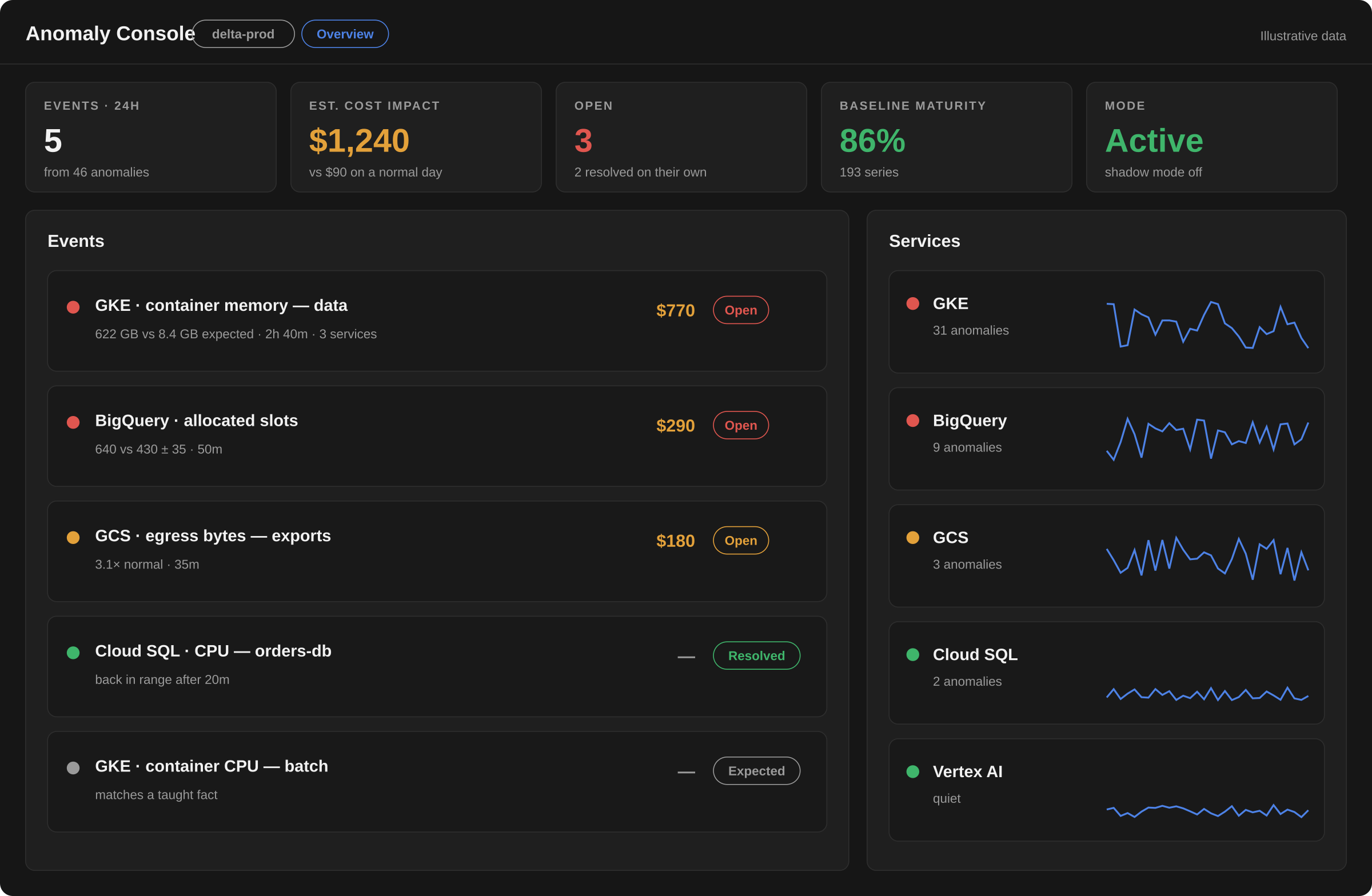
Sela Radar learns what normal looks like for your cloud and alerts your team when usage, reliability or security drifts. It runs entirely in a Google Cloud project you own. Your data never leaves it.
The problem
Most cloud problems are discovered on the invoice.
Billing data arrives late. By the time a cost spike is visible, the workload behind it has been running for days, and nobody knows which resource changed. Alert rules only catch what someone thought to configure in advance.
Late
Cost reports lag behind usage. The signal is in your metrics long before it is in your bill.
Unattributed
A bigger number on the invoice does not say which service, project or deployment caused it.
Manual
Static thresholds need tuning per service and go stale as workloads change.
How it works
Three steps, all inside your own project.
Install in a project you own
You run the install commands yourself in a dedicated Google Cloud project. Nothing is pushed into your environment, and you choose when to upgrade.
It learns your normal
Radar reads raw usage metrics and builds a baseline per service, per weekday and per hour, so a busy Monday morning is not mistaken for an incident.
Alerts where your team works
Anomalies are grouped into events and sent to the channels you configure, with a daily report at the time you choose.
The agents
Three agents. Switch each one on or off.
Each agent is a separate module with its own service account and its own permissions. You install only the ones you want.
Security and data protection
Your data stays in your project. Sela has no way in.
This is the design, not a setting. Every statement below is something you can verify in your own project.
SELA
- This website and the console interface
- Sign-in routing, tenants and releases
- Receives usage and health counters only
Your browser calls your backend directly, with your own Google identity
Counters only, outbound, in a published schema
No connection is ever opened from Sela into your project
YOUR GOOGLE CLOUD PROJECT
- Backend API that verifies who you are and enforces roles
- Agents and the detection pipeline
- Metrics, baselines, anomalies and findings in BigQuery
- Agent processing on Vertex AI
- Webhook URLs and keys in Secret Manager
Where your data lives
Metrics, baselines, anomalies, findings, configuration, logs and agent conversations stay in your project. Agent processing runs on Vertex AI in your project.
What Sela cannot do
Sela opens no inbound connection to your environment and holds no credentials for it. Sela staff see nothing unless you add them.
How you sign in
With your own Google identity. Your backend verifies the token and enforces roles. A token is bound to one installation and cannot be replayed against another.
Your backend's address is public
Your browser reaches it directly, so it is an open endpoint in your project. It accepts nothing without a valid Google token for your installation and your role, limits the request rate and how far it can scale, and is the only Sela Radar service that is reachable. If your organization requires otherwise, put your own Identity-Aware Proxy in front of it.
What Sela does receive
Usage and health counters only, in a closed, published schema. Planned The console shows you the exact messages that were sent.
What the agents can do
Read-only by default. Two write actions exist, each only after your approval: creating an alert policy, and opening a pull request once you approve the full diff. Agents never merge, never write to a default branch and never change resources.
How you leave
Delete the project. What remains at Sela is usage and billing counters, kept for the contract retention period.
Integrations
Works with the tools your team already uses.
- Slack
- Webhook
- Cloud Monitoring alerts
- Security Command Center
- GitHub Planned
Questions and answers
The questions security and platform teams ask first.
Where is my data stored?
In the Google Cloud project you create for Sela Radar. Metrics, baselines, anomalies, findings, configuration and agent conversations all stay there.
What does Sela receive?
Usage and health counters in a closed schema, for example how many anomalies were detected and whether the pipeline is healthy. No resource names, no metric values, no findings. Showing every message sent in the console is planned.
Who can access my environment?
Only users from the Google domains you allow, with the roles you assign: Viewer, Editor or Admin. Sela holds no credentials for your project.
What does it cost to run?
The running cost of the pipeline, BigQuery and Vertex AI appears on your own Google Cloud bill. Sela sets no usage quotas.
What permissions do I grant?
Each agent has its own service account with read roles at project level, listed on its card before you enable it. The install commands are generated for you and you run them yourself, so you see every grant.
Can I turn an agent off?
Yes. Each agent is a separate module. Off means it is not installed and has no permissions.
How do I get started?
Sign in with your work Google account, choose the projects to monitor, and run the generated install commands in Cloud Shell. Radar then builds a baseline before it starts alerting.
How do I leave?
Delete the project. Everything Radar stored is deleted with it.
About
Built by Sela, from real production work.
Sela is a cloud services company and a Google Cloud partner. Our engineers design, build and operate cloud environments for customers every day.
Sela Radar started as an anomaly detection system built for a production environment, where the cost of a problem was only visible days later on the bill. We turned it into a product with one rule we would want as a customer: everything runs in your project, and the vendor has no access.
Contact
Talk to us.
Tell us about your environment and we will get back to you about access.